Mac, Windows, Linux and iPhone · Private beta
All your Claude Code and Codex sessions in one app
Juggl shows which session is waiting on you, follows every request until it is done and lets you answer from your Mac or your iPhone.
Free during the beta. For Mac, with Windows and Linux in beta.

Why Juggl
With several agents at work, the chats pile up in terminals and windows. Requests get lost, you cannot tell which session is waiting on you, and you have to stay at the computer.

With Juggl

One chat that coordinates the others
Ask Juggl who needs you, or tell it what to send and to which session.

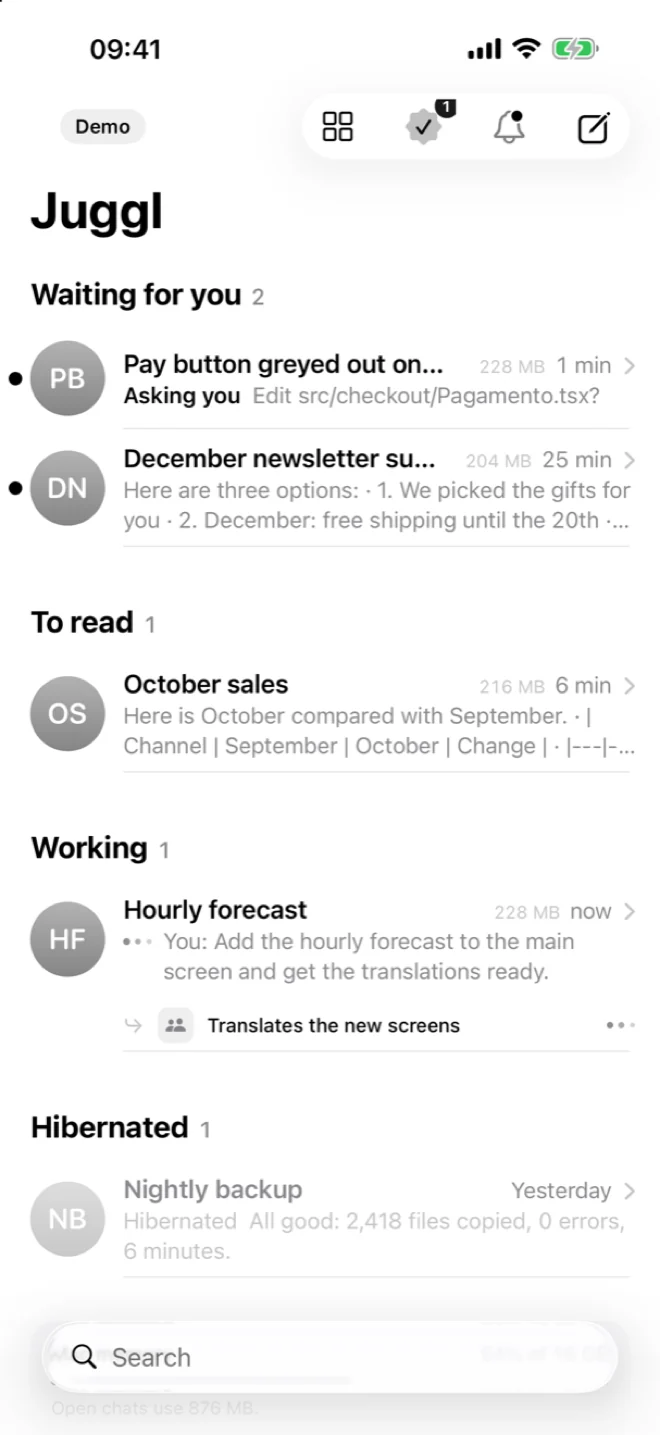
Who needs you, at the top
Sessions waiting for an answer or a permission come first, with one line on what to do.

Every request, tracked until it is done
Each thing you ask becomes a request with its state, so nothing gets lost between one chat and another.
Answer from your phone too
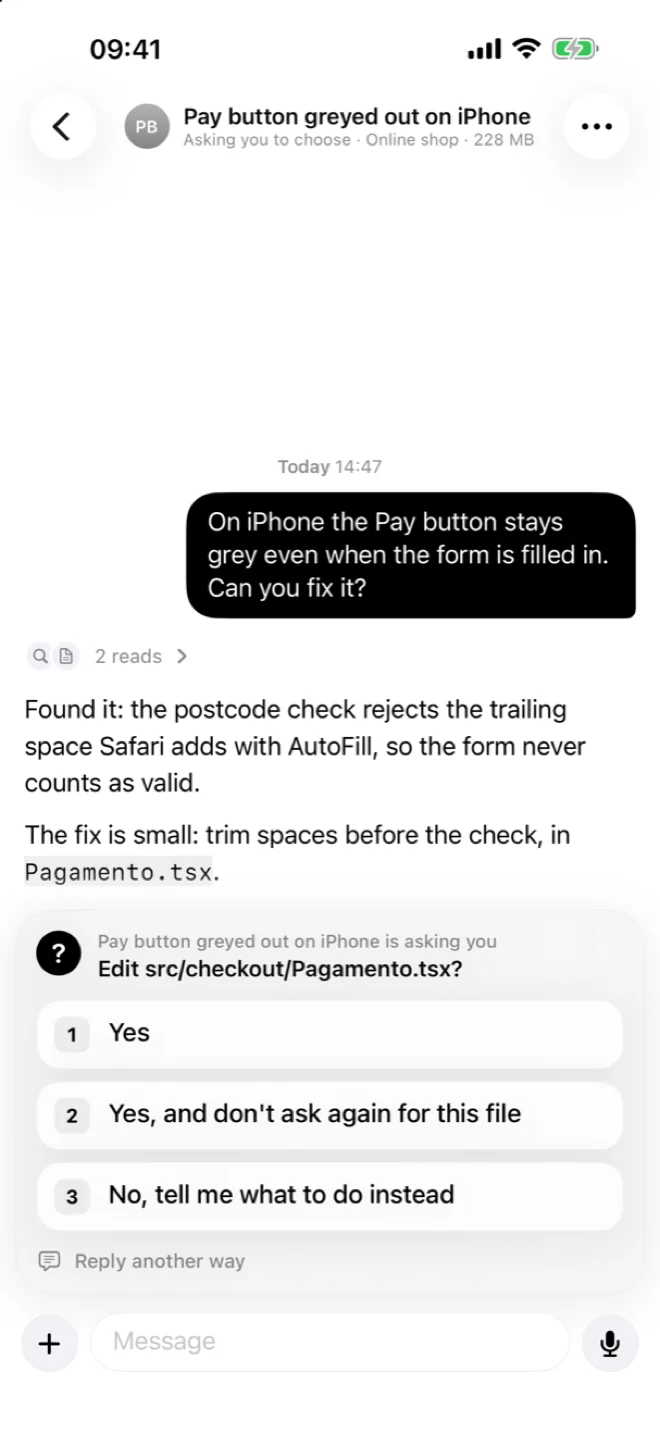
Permissions, choices and messages from the iPhone, connected to Juggl on your Mac.
How it works
Juggl in 35 seconds
- 1
Request access
Sign up with your email. When your account is active, you get the link to download Juggl.
- 2
Open Juggl on your Mac
It finds the Claude Code and Codex sessions you already have, and new chats start from Juggl. You keep working as you do today.
- 3
Answer who is waiting
From your computer or your iPhone: permissions, answers and choices, with every request tracked until it is done.
Who it is for
Several sessions open
You keep Claude Code or Codex at work on more than one project and lose track of which one asked you something.
Many projects a day
Each chat keeps its project, its name and its history, so you pick up where you left off.
Away from the desk
You want to approve a permission or answer a question from your phone, without opening a terminal.
What it does
Six things Juggl does every day, shown with the real app and sample projects.
Who is waiting on you, at the top
Sessions that need an answer or a permission sit at the top, with a short line on what you have to do. Below them, the ones at work, with elapsed time and sub-agents. Several chats on the same project fold into one row.

Every request, tracked until it is done
Juggl reads what you ask in each message and keeps a list: what needs you, what is in progress, what got no answer, what is done. Ask three things in one message and you see three requests, so nothing slips.

Cards in the answers
Agents can answer with cards instead of long text: the progress of a job, a choice with buttons, the numbers that matter, a checklist for you. Tap an option and the answer goes back to the session.

In progress
One page with everything that is moving. First the questions, with Ok, No and Reply buttons. Then each session at work, with what it is doing now, how many steps are done and which sub-agents are running.

Usage
How much of your weekly Claude limit each chat used in the last 30 minutes, the last hour, today and this week, with an estimate of when you run out at this pace. If a chat burns too fast you get a notice, and you can stop or pause it from there.

From your iPhone
A native iPhone app connected to Juggl on your Mac. Same list, same chats, same buttons for permissions and choices. Dictate a message and the text appears while you speak. A notification tells you when a session needs you.

Also in Juggl
Live chat
Every chat streams as it happens. The Now panel shows the running command, the files touched and the steps done.
Side-by-side columns
Up to four sessions next to each other, each with its own reply box.
Import
On first launch Juggl finds your projects and your existing Claude Code chats, ready to pick up.
Search
Find any conversation, open or closed, and resume it with its full history.
Hibernation
Sessions idle for hours go to sleep and free memory. They resume with the whole conversation.
Autopilot
When a session only asks whether to continue a plan you already approved, Juggl replies after a countdown you can cancel.
Privacy and permissions
Juggl runs on your computer and works with the files your agents already keep there.
You approve what agents do
New accounts start on Ask every time: before a command or a file change, Juggl asks you with Allow, Always allow in this chat or Deny, on your computer or your iPhone. You can switch to file edits allowed and commands on request. Never ask is there too, and it has to be confirmed.
Runs on your computer
Juggl reads the session files that Claude Code and Codex write on your disk. Sessions it starts use the official tools with your own login.
No server reads your chats
There is no Juggl server in the middle of your conversations. Your account only holds what the license needs.
Your account, your keys
Sessions run with your own Claude Code or Codex login. Juggl never asks for your password or your keys.
iPhone talks to your Mac
The iPhone app connects to your Mac directly, on your network or through your own Tailscale.
Platforms
Juggl runs on your computer. The iPhone app connects to it.
Mac
AvailableThe full app, with dictation and every feature on this page.
- macOS 13 or later
- Apple silicon and Intel
Windows
BetaWorks with Claude Code. Dictation is not there yet.
- Windows 10 or 11
- 64-bit
First install
The installer is not signed yet. The first time, Windows shows “Windows protected your PC”: choose More info, then Run anyway. Juggl installs for your user only, without administrator rights.
Linux
BetaWorks with Claude Code. Dictation is not there yet.
- Ubuntu 22.04 or later
- 64-bit
- .deb or AppImage
First install
For the .deb: sudo apt install ./file.deb. For the AppImage: make it executable (chmod +x) and open it.
iPhone
Beta on TestFlightConnects to Juggl on your Mac. On the App Store after Apple's review.
Android
Coming soonIn development.
Private beta
Juggl is in a private beta for Mac, Windows and Linux. We let people in small groups and read every request. It is free during the beta.
- 1Request accessYour email and two quick answers.
- 2Confirm your emailWith a 6-digit code. No password.
- 3You get inWe approve people in small groups and email you the download link.
- macOS 13 or later
- Windows 10/11 or Ubuntu 22.04 (beta)
- Claude Code or Codex with your account
Questions
Is it free?
Yes, during the beta. If that changes, people in the beta will know first.
Can agents run commands without asking?
Not unless you choose it. New accounts start on Ask every time, with Allow, Always allow in this chat and Deny. Never ask has to be confirmed.
Does it replace Claude Code or Codex?
No. Juggl works on top of them. Your sessions use the official tools with your own account and your own limits.
What does Juggl read on my Mac?
The session files that Claude Code and Codex already write, plus its own lists and settings. It does not send them anywhere.
Is there a version for Windows or Linux?
Yes, in beta: Windows 10 and 11, and Linux (Ubuntu 22.04 or later). Android is in development.
When can I use the iPhone app?
It is in beta on TestFlight, and the App Store version comes after Apple's review. It connects to Juggl on your Mac, on the same network or through Tailscale.
Something else? hello@juggl.dev